
Affiliate Disclosure
This CinemaStudio AI review provides independent editorial coverage from AI Growth Verdict. Some links, marked as sponsored, are affiliate links. Commissions are possible at no extra cost to you. Scores and verdicts remain independent of any commissions earned. CinemaStudio AI is sold through JVZoo. All vendor-provided numbers, such as prices, credits, and output claims, are marketing claims from the sales materials. Readers must verify live terms on the sales page before purchase.
Fast Verdict: CinemaStudio AI Scores 7.2/10
CinemaStudio AI scores 7.2/10 as a browser-based, story-first AI movie maker. This AI filmmaking software claims to turn one idea into short films, trailers, episodic series, animated stories, product commercials, brand films, and social videos. It positions itself for creators, marketers, affiliates, faceless YouTube operators, agencies, and brands that require story continuity alongside Director Mode features in a single browser tool.
Target users will handle their own editing and fact-checking. Deductions come from sales-page inconsistencies, unclear credit-to-render mappings, unresolved placeholders for monthly film limits [X] and maximum runtimes [Y], upsell stacks, and limited independent evidence on output quality.
This AI short film generator earns credits for its integrated story-to-final-cut workflow, character and world continuity claims, Director Mode controls, browser-based timeline editing, and a low reported front-end launch price.
Pros
- Story-to-script-to-storyboard-to-edit workflow in one platform.
- Character Studio for consistent cast across shots and episodes.
- Director Mode with camera, lens, lighting, and color controls.
- Claimed one-time launch pricing model.
- 30-day money-back guarantee claim.
- Commercial rights claim for outputs.
Cons
- Visual styles listed as 10 in some sections, 20 in others.
- Story categories vary between 10 and 20 across page sections.
- Runtimes claimed as 15-90 seconds in recap, up to 5 minutes in details, with FAQ [Y] unresolved.
- [X] monthly films placeholder leaves capacity unclear.
- 2,500 credits with no explicit credit-to-render breakdown.
- Upsell and bundle stack adds complexity.
- No independent verification of output quality.
Best For
Creators, marketers, affiliates, faceless YouTube operators, agencies, and brands who want a story-first AI cinematic video generator with Character Studio continuity and Director Mode in one browser studio. Buyer fit is strongest when you will still edit, fact-check, and confirm live credit, runtime, and license terms.
Not For
Buyers who need guaranteed film quality, virality, or revenue. Teams that need audited enterprise SLAs. People who only need a talking-avatar presenter in the HeyGen lane. People who only need a timeline editor in the CapCut lane. Anyone who will not read license, credit, and runtime terms before paying.
Verify all claims live, as launch conditions may shift to subscriptions.
Check the current CinemaStudio AI offer
What is CinemaStudio AI?
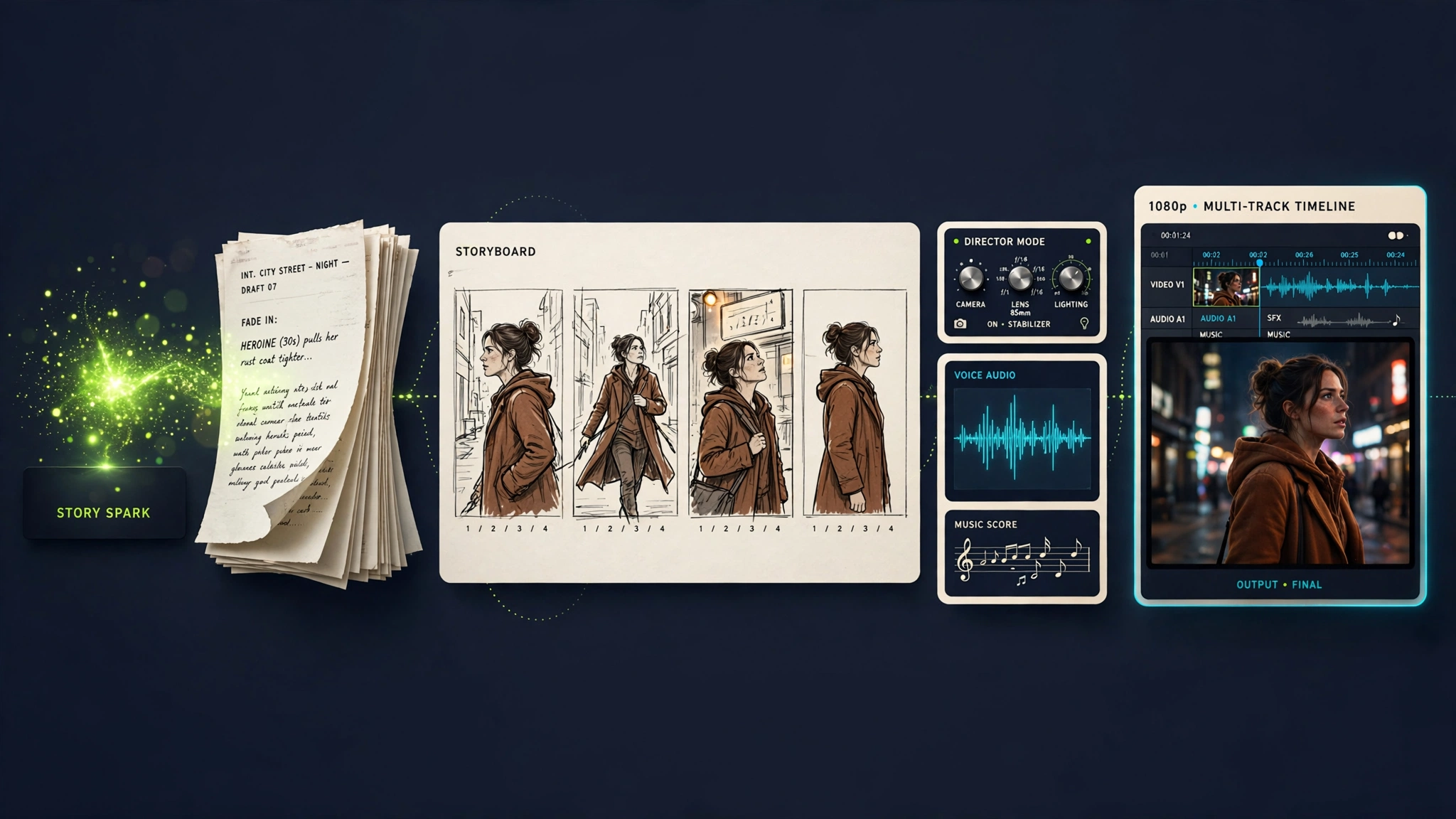
CinemaStudio AI is a browser-based AI cinematic video generator and AI script to video tool. It functions as an AI story generator with characters, a built-in screenwriter, a consistent digital cast, and Director Mode for scene control. Users type an idea, and the vendor page claims the studio can produce a logline, a complete script, a scene-by-scene breakdown, voices, music, and a finished film without installing desktop software.
The sales pitch is story first. Random five-second AI clips are everywhere. CinemaStudio AI sells a hero, a problem, and an ending, then wraps that story in camera, lighting, and sound controls. That is the product category: an AI movie maker and AI filmmaking software, not a talking-head avatar app and not a raw video-model lab.
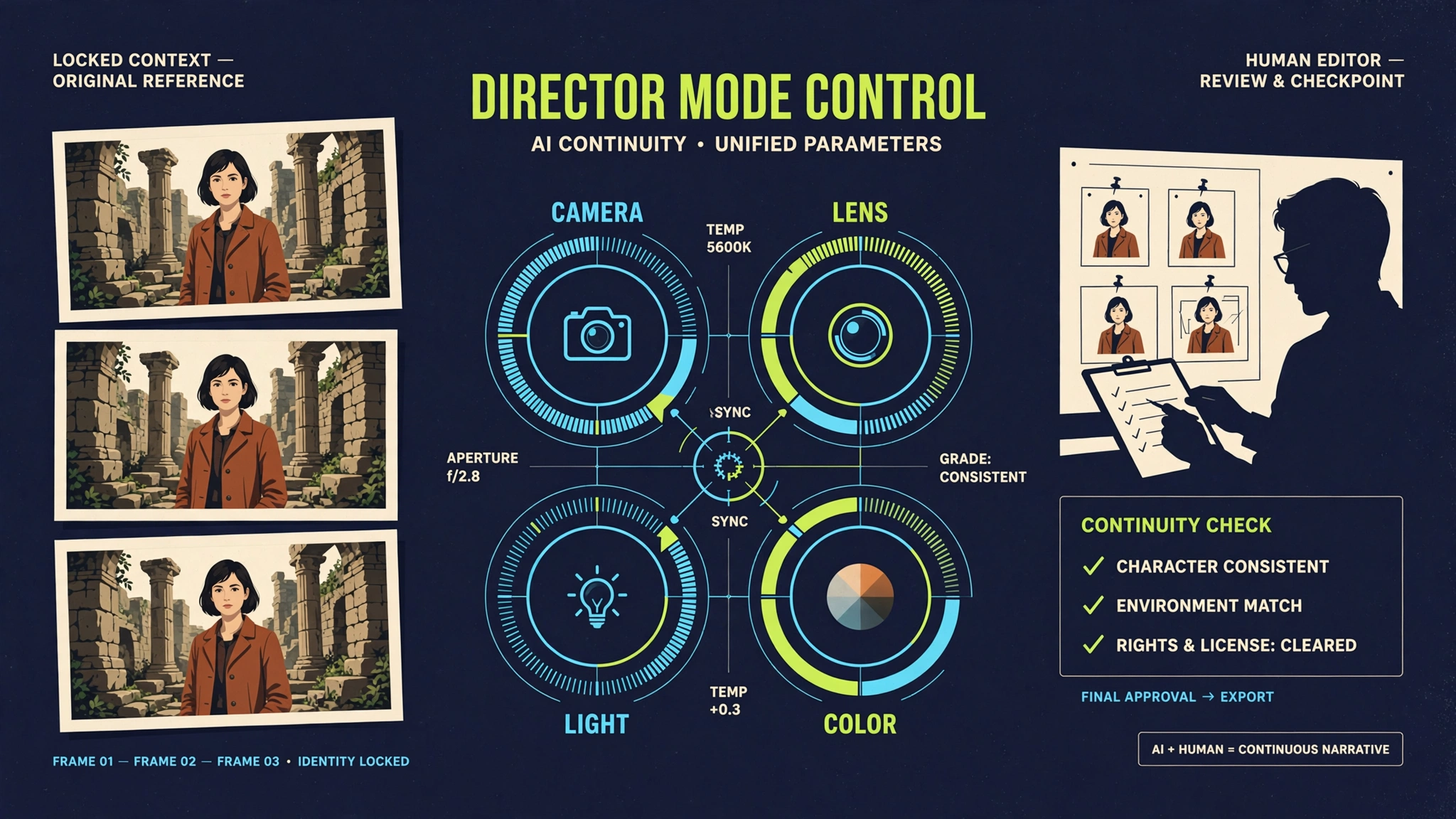
If no cast is supplied, the page says the AI can cast the film. Character Studio claims you can build a lead from a description or a reference photo, lock face and wardrobe, and reuse that character across shots and episodes. Location and world saving is part of the same continuity pitch. Treat locked appearance as a vendor claim until you render a multi-shot sequence yourself.
Founders Pankaj Malav and Deepanker appear with vendor-provided background on other products and agency work. That is background copy, not independent proof of film quality, audience growth, or revenue. Check the official CinemaStudio AI sales page for current feature lists, then confirm the same limits inside the live checkout and product.
How Does CinemaStudio AI Work?
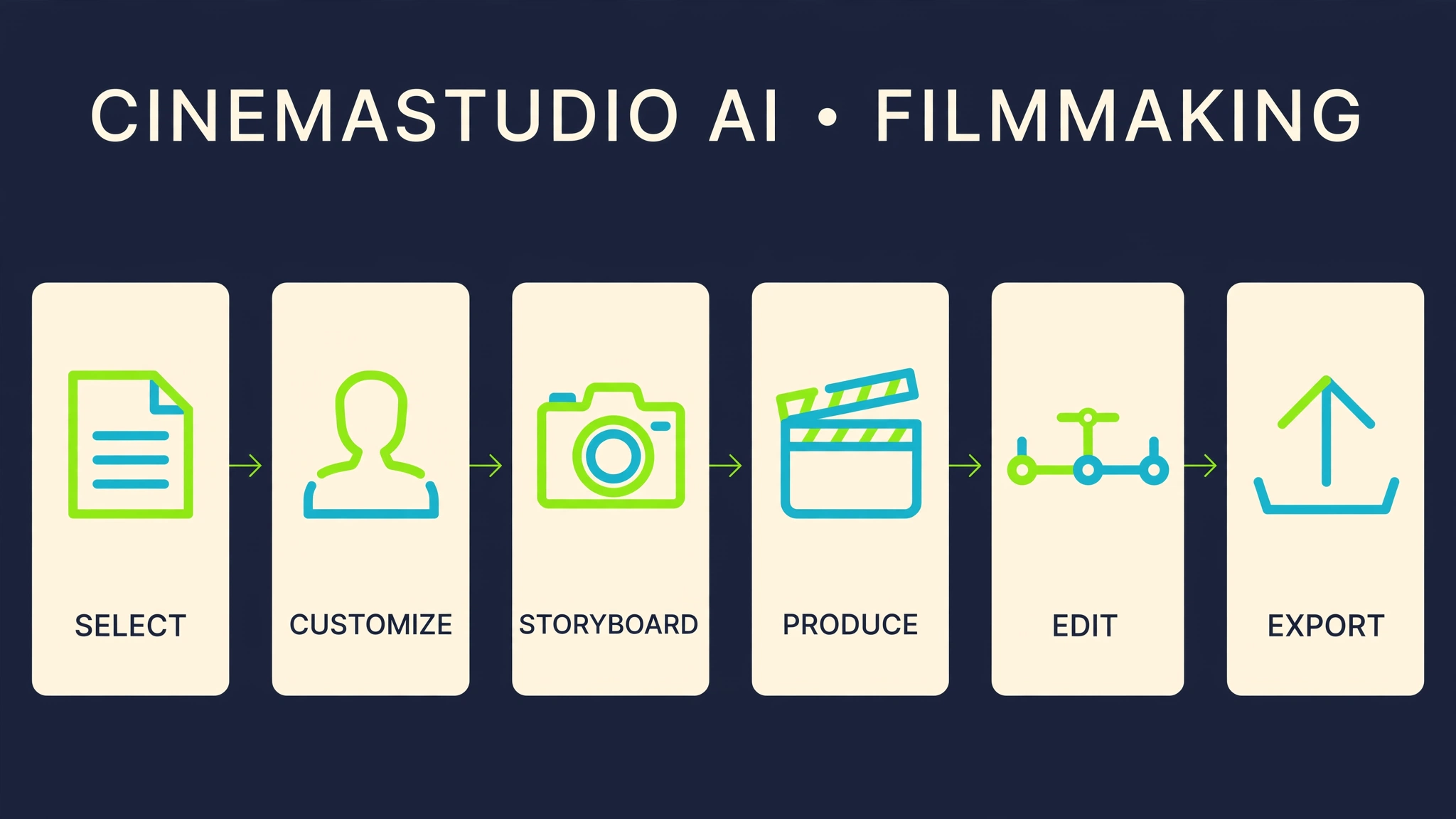
CinemaStudio AI works through official steps labeled Select, Customize, Produce, Profit. In practice you choose a template, a generated concept, a pasted script, or one idea. You then set cast, world, tone, language, audience, visual style, format, and cinematic direction. The page claims a shot-by-shot storyboard shows camera and audio before render. You can edit a line, add a shot, regenerate a frame, rewrite the film in plain text, or control the ending. After approval, the studio claims to mix narration, character speech, score, and sound design, then drop the result into a browser timeline for trim, reorder, captions, and export.
One-click ideation is claimed to produce four original pitches, each with a hero, stakes, and a setting. Tone, structure, and ending type are presented as controls rather than prompt puzzles. That is why the vendor calls it story-first. Your job is still to reject weak plots, fix continuity, and keep claims honest before you publish.
What Does CinemaStudio AI Include?
The story engine produces loglines, complete scripts, and scene-by-scene breakdowns with beginnings, twists, and endings. Character Studio accepts descriptions or reference photos to create pose and expression sheets. Users lock faces, wardrobes, and presences for reuse across shots and episodes, with saved characters and locations.
Base offer claims up to 5 custom characters and 5 universes; Unlimited Pro claims unlimited access. Hundreds of templates cover stories, trailers, and commercials. Named categories include Action & Heroism, Children's Stories, Devotional, Romance, Dystopian, Road Trip, Treasure Hunt, Space Exploration, Lost World. Note inconsistency: some sections list 10 categories and 100+ sub-genres, others 20 categories. Verify live.
Visual styles conflict between 10 and 20 listings. Examples: cinematic realistic, photorealistic, 3D animation, anime, watercolor, cyberpunk, dark gothic, comic book, claymation, found-footage, retro vintage. Claims combine to over 400 looks. 16 environments: city street, desert, ocean, forest, futuristic city, ancient ruins, temple, battlefield, laboratory.
Director presets: Golden Hour, Rembrandt, Firelight, Backlit Haze, Storm Grey, Teal & Orange, Bleach Bypass. Director Mode controls film setup, camera, lens, lighting, color palette, pacing. Shot-by-shot storyboard allows editing lines, adding shots, regenerating frames, rewriting text, controlling endings, describing music plainly.
Audio features AI narration (male/female), lip-synced dialogue, cinematic scores, ambience, SFX. 20 languages: English, Spanish, Hindi, Arabic, Chinese, Portuguese, French, Japanese, German, Korean, more. Audiences: Kids, Teens, Adults, Family. Tones: Emotional, Funny, Dark, Inspiring, Suspenseful, Heartwarming, Cinematic, Shocking, Authority.
Exports in 9:16, 16:9, 1:1, custom; FAQ claims 1080p. Runtime warning: details say 15 seconds to 5 minutes with presets; recap limits to 15-90 seconds; FAQ [Y] unresolved. Browser timeline offers multi-track trim, reorder, music, voice, captions, undo/redo, voice adjustments, user media uploads.
Claims include cinema-quality 1080p, watermark-free MP4, no install for Mac/Windows/Chromebook, cloud library, updates, support. Treat as vendor claims; verify.
Review the live CinemaStudio AI packageHow Much Does CinemaStudio AI Cost?
Captured launch copy shows $97/month crossed out for Today Only $37 with coupon Early10, presented as one-time payment with waived monthly fees. This reflects launch terms; the page warns of potential shift to yearly subscriptions. Claims 2,500 video credits monthly, no fees, no per-clip charges, but lacks credit-to-render clarity. [X] monthly films placeholder means capacity unverified.
| Reported Sales-Page Offer | What It Appears to Add | Verify Before Buying |
|---|---|---|
| Commercial Edition (front end, claimed $37 value) | AI Story Engine, hundreds of templates, 20 visual styles (conflicts with 10 elsewhere), custom characters, AI voice/music, HD export, commercial license. | Confirm current front-end limits and access. |
| Unlimited Pro (claimed $67 value) | 2,500 video credits, up to 5-minute films, unlimited characters/worlds, Pro Director Controls, unlimited projects/exports, 10x faster rendering, 5 team members, 5 GB storage. | Appears as upgrade; base may lack these. |
| CinemaStudio Series (claimed $47 value) | 5/10/20 episode seasons, AI Season Planner, consistent cast/worlds, cliffhangers, 50+ series templates, 10 formats, one-click seasons, recaps, teasers, playlists. | Verify inclusion and episode limits. |
| CinemaBox (claimed $67 value) | Branded Netflix-style site, unlimited channels/series, one-click publish, viewer accounts/watchlists, subscriptions/pay-per-view, ads/CTAs, analytics, mobile/desktop, license. | Confirm hosting and monetization terms. |
| Loop StudioAI (claimed $67 value) | Mood & Mind Films, 20 moods/20 music styles, AI music/narration, 30+ looping visuals, topic packs, 20 voices/languages, batch series, 1080p export, CinemaBox publish, license. | Check integration with core tool. |
| WebFramer, FlowMotion, others | Additional bonuses like Tuneforge AI, Leaddialer AI, QuickQR Code per captured stack. | Do not assume inclusion; confirm bundle access. |
Bundle shows front end plus OTO 1-4; coupons like Early10, CINEMA50 (labeled 10% off, inconsistent). Values shift; not street prices. 30-day refund claim, procedure not detailed. Urgency via limited copies, increases. Verify for AI video credits and one-time pricing.
Verify CinemaStudio AI pricing and upgradesOTO and bundle details expand the stack. Unlimited Pro unlocks credits and longer runtimes. Series adds episodic tools. CinemaBox provides distribution. Loop targets meditative content. Verify current bundle terms, as dynamic elements like countdowns change.
Verify the current bundle termsCinemaStudio AI Use Cases
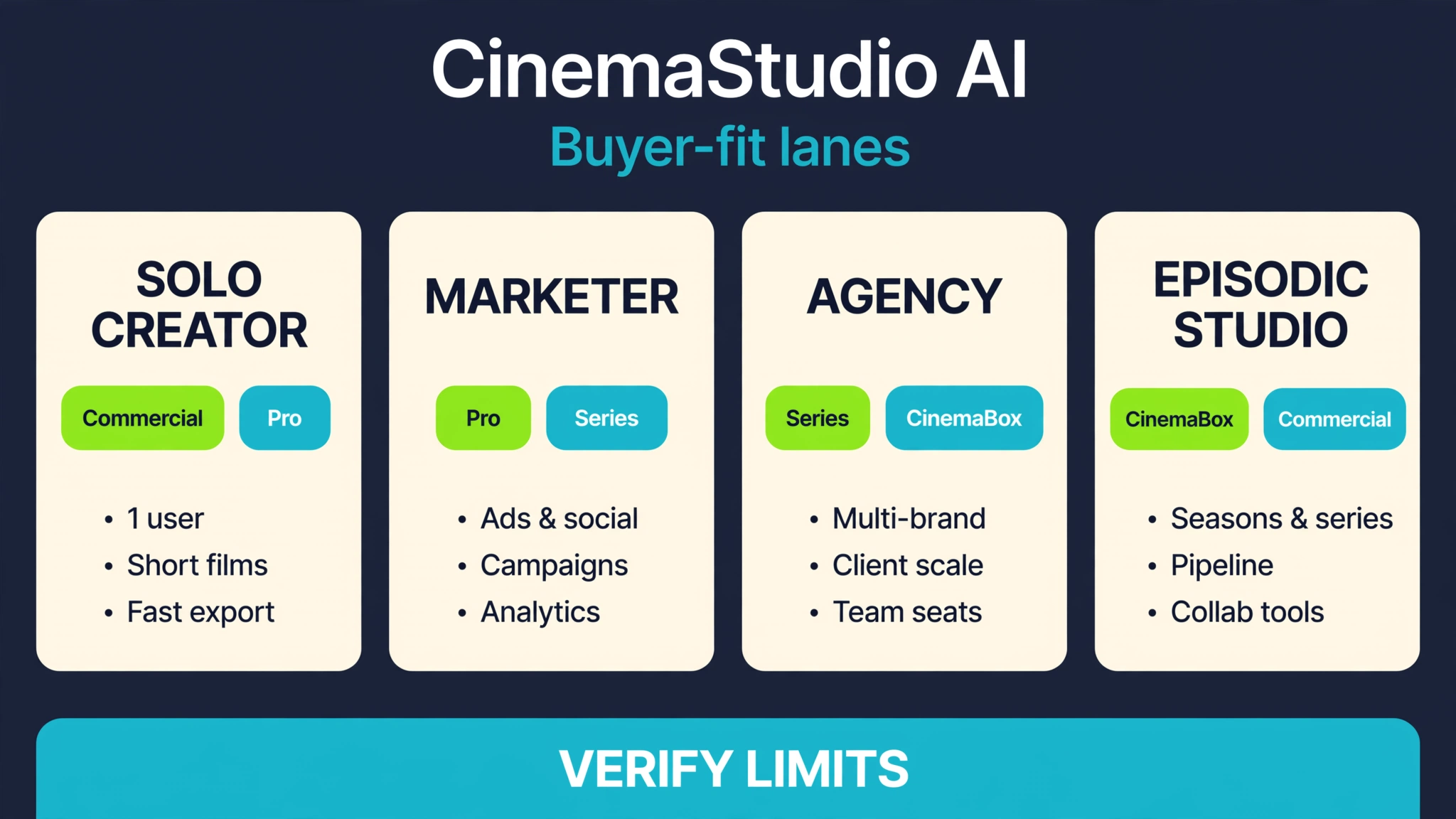
Solo Filmmakers
Solo filmmakers get the clearest pitch: one idea in, a short film or trailer out, without hiring a crew. The page claims you can pick a template, paste a script, or start from a sentence, then control ending, tone, and visual style. That can replace a blank-page problem. It does not replace taste. Continuity still breaks. Dialogue still sounds generic. You still need to watch every shot before you publish. Likeness and music rights stay on you. There is no guarantee of festival quality, views, or platform approval.
Marketers and Affiliate Creators
Marketers and affiliates are sold cinematic promotions that people choose to watch instead of skippable ads. As an AI video maker for YouTube, TikTok, and Instagram, the page claims vertical, square, and widescreen exports. That is useful for offer trailers, product stories, and hook-first shorts. It is not a traffic system. You still need an offer, a landing page, tracking, and claims that survive ad review. Treat vendor testimonials as sales-page quotes, not proof of commissions.
Faceless YouTube Channels
Faceless operators can use Character Studio and saved worlds to build recurring casts without appearing on camera. That is the AI story generator with characters angle. Recurring faces help series packaging. You still need a niche, titles, thumbnails, and a publishing cadence. You also need to follow platform rules on AI content, copyrighted characters, and misleading thumbnails. Audience growth is not included in the software.
Brands and Product Commercials
The page shows product commercials, brand films, smartwatch ads, headphone ads, and book trailers. An AI product commercial maker is a fit when you already have a product, a promise, and a legal reviewer. Upload a product shot, lock a character if you use a face, and keep claims inside what you can prove. Trademarked logos, competitor likenesses, and medical or income claims need human review. Watermark-free 1080p is a page claim. Confirm export quality on your first render.
Agencies and Client Services
Agencies are sold client commercials, launch trailers, and branded stories without a traditional crew. Unlimited Pro copy mentions 5 team members and 5 GB of cloud storage. Treat that as upgrade copy, not a base-plan promise. Put AI usage, revision rounds, and likeness consent into the client contract. If a client supplies a face or voice, get written permission. If you sell the films, read the commercial license. Detailed ownership, prohibited uses, and client-seat terms were not fully visible in the captured sales copy.
Episodic Creators
CinemaStudio Series is pitched as an AI episodic series generator with season lengths, cliffhangers, recaps, teasers, and playlists. Consistent cast and worlds are the reason to look at this lane. The front-end recap still lists up to 5 custom characters and 5 custom universes, while Unlimited Pro claims unlimited characters and worlds. Confirm which plan you are buying before you storyboard a 20-episode season. Human review for plot holes remains mandatory.
Educators and Children's Content
Children's stories, family audience settings, and devotional films appear in the template list. Extra caution applies. Age-appropriate tone is a setting, not a safety system. Do not use a child's photo as a character reference without guardian consent. Check platform policies for kids' content, music, and AI disclosure. Educational accuracy still needs a human editor. This is not a classroom compliance tool.
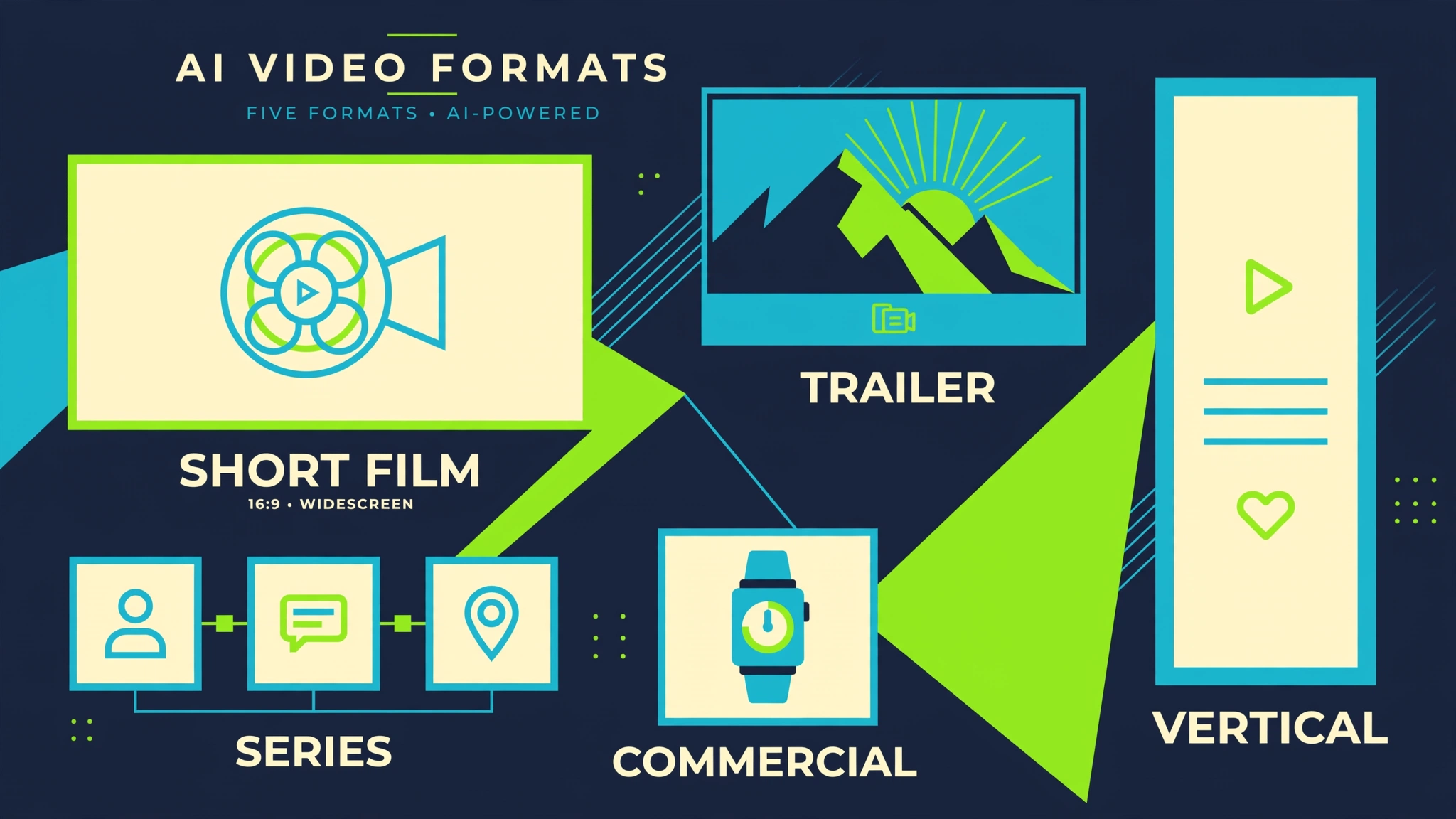
Claimed formats cover short films, trailers, series, kids animations, devotionals, commercials, book trailers, biographies, social videos. Examples: action, anime, 3D kids, product ads, historical bios.
AI requires human checks for facts, likeness/voice consent, music rights, trademarks, safety, policies. No promises on quality, views, or earnings.
See CinemaStudio AI for your content laneWho Should Use CinemaStudio AI?
Digital marketers, affiliates, faceless YouTube creators, agencies, brands, and solo filmmakers should use CinemaStudio AI when the job is story continuity plus Director Mode in a browser, and when a low reported launch price is the entry point. Buyer fit requires you to verify credits, runtimes, styles, and license, then commit to human review. Avoid the tool if you need audited quality, enterprise support, a talking avatar, or a specialist timeline editor only.
If you produce kids' content, client commercials, or anything with a real person's face, the rights checklist above is part of the purchase decision. If you only need 15-second hooks and already live in CapCut, stay there. If you want an AI episodic series generator with saved worlds, this is the lane to inspect, after you confirm which plan actually includes unlimited characters.
Is CinemaStudio AI Worth It?
CinemaStudio AI is worth a careful look if you want a story-first AI short film generator and AI product commercial maker at a low reported launch price, and you will verify credits, runtimes, styles, and license before you scale. The 7.2/10 score is a buyer-fit score, not a quality certificate. The workflow is the reason to consider it. The sales-page inconsistencies are the reason to slow down.
Skip it if you need proven output quality from independent tests, a talking presenter, or a specialist editor only. Skip it if you will treat 2,500 credits, 5-minute films, or unlimited characters as guaranteed base-plan facts. Those items sit in conflicting copy and upgrade language. The 30-day money-back claim is the risk control, if the refund path works as advertised. Confirm that path before you buy.
Best CinemaStudio AI Alternatives
CinemaStudio AI alternatives depend on the job. Compare the studio you need, not a slogan. CinemaStudio AI vs CapCut is a story-studio versus a timeline editor. CapCut and Canva ship templates, captions, and huge distribution. They are stronger if you already have footage or stills and you want fast social cuts. CinemaStudio AI's claimed differentiator is story continuity, saved characters and worlds, Director Mode, and a browser path from script to cut.
CinemaStudio AI vs Runway is an integrated film workflow versus a generation lab. Runway-class tools are often stronger when you want the deepest raw AI video model, image-to-video experiments, or shot-level generation. CinemaStudio AI sells screenwriter plus cast plus camera plus editor in one product. That is a different promise. It is not proof that every frame will beat a specialist model.
CinemaStudio AI vs HeyGen is cinematic scenes versus a presenter. HeyGen-style avatar generators fit talking-head explainers, training, and spokesperson videos. CinemaStudio AI is an AI trailer maker and AI short film generator with characters, worlds, and score. If you need a person speaking to camera, start in the avatar lane. If you need a story with shots and an ending, this is the category under review.
A manual script plus a human editor still wins for legal clarity, brand control, and shot-level taste. Use CinemaStudio AI when the bundled workflow is the point. Use a specialist stack when one layer, model quality, avatars, or editing craft, matters more than integration. No comparison here is a ranked benchmark. We did not run a side-by-side lab test.
What the Sales Page Does Not Clearly Confirm
- Credit-to-render calculations for 2,500 credits.
- Monthly film output [X].
- Maximum runtime: [Y] vs 90 seconds vs 5 minutes.
- 10 vs 20 visual styles and categories.
- Commercial license details, prohibited uses, client seats.
- Privacy policies.
- Refund procedures.
- Comparison table is image-based.
- No earnings disclaimer in captured text.
Quality-Control Checklist
Run this pass on every render before a client sees it or a platform does. AI film quality is not guaranteed. The storyboard preview is a claim, not a substitute for watching the file.
- Watch the full cut for face drift, wardrobe changes, extra fingers, and location jumps.
- Check plot logic: beginning, twist, ending, and whether the hero still matches the logline.
- Confirm language, accent, lip sync, and subtitle accuracy if you add captions.
- Listen for score clashes, missing ambience, and voice speed that fights the picture.
- Verify aspect ratio: 9:16, 16:9, or 1:1 against the destination platform.
- Export a 1080p MP4 sample and inspect compression before you batch more films.
- Keep a shot list of what you regenerated so you do not lose a good scene while fixing a bad one.
Copyright and Consent Checklist
- Do not upload a person's photo as a hero without written likeness consent.
- Do not clone a client's face, voice, or brand mascot without a signed brief.
- Clear music and sound-effect rights if you mix user uploads with AI score.
- Avoid trademarked characters, celebrity lookalikes, and protected logos.
- For children's content, get guardian consent and follow platform kids' rules.
- Disclose AI-generated media where YouTube, TikTok, Instagram, or ad networks require it.
- Read the commercial license. Public sales copy is not a substitute for the terms.
Buyer Checklist
- Confirm live front-end price, coupons, and whether the fee is still one-time.
- Ask how 2,500 monthly video credits map to renders at your target runtime.
- Resolve the [X] monthly films placeholder and the [Y] runtime placeholder.
- Count visual styles and story categories inside the app, not on the sales page.
- List which OTOs you need: Unlimited Pro, Series, CinemaBox, Loop StudioAI.
- Treat WebFramer, FlowMotion, Tuneforge AI, Leaddialer AI, and QuickQR Code as separate products until access is confirmed.
- Read refund steps for the 30-day money-back claim before you pay.
- Plan human edits. Do not buy this as a hands-off income machine.
Final Verdict
| Criterion | Score Note | Buyer Action |
|---|---|---|
| Workflow Integration | 8/10: Story-to-cut strong. | Test end-to-end. |
| Continuity Features | 8/10: Character/Director pitch. | Verify reuse. |
| Pricing Clarity | 5/10: Launch claims, ambiguities. | Check live stack. |
| Output Limits | 6/10: Credits/runtime unclear. | Calculate needs. |
| Evidence/Proof | 6/10: Vendor claims only. | Seek demos. |
| Overall | 7.2/10 | Buy if terms match. |
7.2/10 holds for verified-fit buyers. Act on live details.
Check the current CinemaStudio AI offerFAQ
What is CinemaStudio AI?
CinemaStudio AI is a browser-based AI movie maker and AI filmmaking software. The vendor positions it as a story-first studio that turns one idea into short films, trailers, episodic series, commercials, and social videos with a screenwriter, consistent cast, and Director Mode.
How does CinemaStudio AI work?
The official loop is Select, Customize, Produce, Profit. You choose a template, concept, or script, set cast, world, tone, language, and format, preview a storyboard, then render voice, music, and picture into a browser timeline for export.
How much does CinemaStudio AI cost?
Captured launch copy showed $97/month crossed out and Today Only $37 with coupon Early10, framed as a one-time payment with monthly fees waived. Coupons, OTOs, and bundle prices move. Verify CinemaStudio AI pricing on the live checkout.
Is CinemaStudio AI worth it?
It is worth a careful look if you want an AI cinematic video generator with story continuity at a low reported launch price and you will verify credits, runtime, styles, and license. It is not worth it if you need proven output quality or a simple presenter tool. Honest score: 7.2/10.
Who should use CinemaStudio AI?
Use it if you are a creator, marketer, affiliate, faceless YouTube operator, brand, or agency who will still edit and fact-check. Skip it if you need enterprise SLAs, guaranteed views, or only a CapCut-style editor or HeyGen-style avatar.
What are the best CinemaStudio AI alternatives?
CapCut and Canva fit timeline editing. Runway-class tools fit raw AI video generation. HeyGen fits talking avatars. A manual script plus editor fits maximum control. CinemaStudio AI fits a bundled story-to-cut workflow.
Does CinemaStudio AI charge monthly fees?
Launch copy says all monthly fees are waived and the front end is a one-time payment. The same page says the introductory offer may later move to a yearly subscription without notice. Treat no monthly fee as a launch condition, not a permanent contract.
How long can CinemaStudio AI films be?
This is a major buyer warning. A detailed section claims 15 seconds to 5 minutes with seven duration presets. The offer recap says 15 to 90 seconds. The FAQ contains an unresolved [Y] placeholder. Confirm the live maximum before you buy.
What are CinemaStudio AI video credits?
The page repeats 2,500 video credits every month, no monthly fees, and no per-clip surprises. It does not clearly map credits to renders. A visible placeholder says up to [X] films every month. Ask how many credits a 15-second cut versus a 5-minute film consumes.
Does CinemaStudio AI include a commercial license?
The page claims commercial rights, client work, selling films, promoting products and affiliate offers, and keeping 100% of earnings when you act now. Detailed ownership, prohibited uses, and client-seat terms were not fully visible. Read the license before client work.
Will characters stay consistent?
Character Studio claims you can lock face, wardrobe, and presence, generate pose sheets, and reuse characters across shots and episodes. The base recap lists up to 5 custom characters and 5 custom universes. Unlimited Pro claims unlimited characters and worlds. Render a multi-shot test before you trust the lock.
CinemaStudio AI vs CapCut, Runway, and HeyGen?
CapCut is a social editor. Runway is closer to a generation lab. HeyGen is an avatar presenter. CinemaStudio AI is an AI script to video tool with story, cast, Director Mode, and browser editing. Pick the lane that matches the job, then verify live limits.